Saturday, December 31, 2016

Famous Nepalese Deaths of 2016

While 2016 has been a pretty devastating year for the world with the death of iconic people. Nepal also suffered such loss. These are the ones who inspire and motivate people for positive change in their life. These are the ones who practiced their art honestly gaining respect from majority of people.
Here's the list of Nepalese who died leaving a hole in the Nepalese heart.
1. Sushil Koirala (सुशील कोइराला):
Sushil Koirala was born to Bodh Prasad Koirala and Kuminidi Koirala on 12 August 1939 in Biratnagar. Koirala was unmarried and known to live a simple life. A heavy smoker, Koirala was diagnosed with tongue cancer in 2006 and lung cancer in June 2014.[5] He died on 10 February 2016 at 12:50 AM of pneumonia in Kathmandu, Nepal,[6] at the age of 76. He used to be known as 'Sushil daa'.
Sushil Koirala


2. Amber Gurung (अम्बर गुरुङ):
Mahasangeetkar (the great musician)[2] Amber Gurung was born in Darjeeling on February 26, 1938. 
He is the composer of the National Anthem of Nepal 'Sayaun Thunga Phool Ka'. He is the author and recording artist of more than 1000 songs. He was honored with more than 25 life-time awards and felicitations. On the morning of June 7, 2016, Gurung died at age 79 during the course of his treatment at the Grande International Hospital. Gurung had previously undergone treatment for a tumor in his esophagus. Gurung was rushed to the ICU and was kept on a ventilator the previous day.
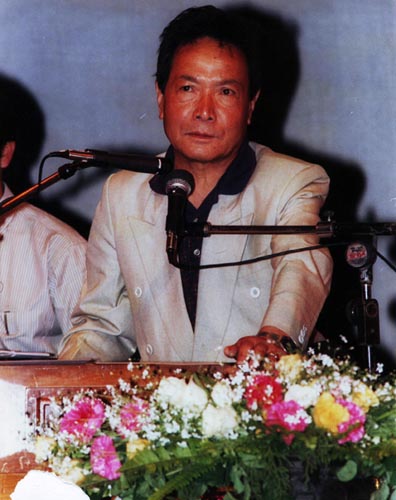
Amber Gurung

Saturday, June 16, 2012

How Facial Recognition Works


When you look at your face you can distinguish various different things. These are the things that facial recognition softwares use to recognize your face. There are about 80 nodal points on a human face. Some of them are:-
1. Width of nose
2. Distance between eyes
3. Cheekbones
4. Jaw line
5. Depth of eye sockets

These nodal points are measured and coded in computer understandable form. Facial Recognition is a small part of BIOMETRICS. The idea behind biometrics is to distinguish us from others using various of our unique properties. Other than Facial recognition, Fingerprint scan, Retina scan, Voice identification are also part of Biometrics.

Facial recognition system goes under 5 simple steps:

1. Detection - When the system is attached to a video surveillance system, the facial recognition software searches video camera for faces. If there is face in the view, software detects it within a fraction of a second. A multi-scale algorithm is used to search for faces in low resolution.The system switches to a high-resolution search only after a head-like shape is detected.

2. Alignment- Once a face is detected, the system determines the head's postion, size and pose. A face needs to be turned at least 35 degrees toward the camera for the system to register it.

3. Normalization - The image of the head is scaled and rotated so that it can be registered and mapped into an appropriate size and pose. Normalization is performed regardless of the head's location and distance from the camers.

4. Representation - The system translates facial data into unique code. This process allows for easier comparison of the newly acquired facial data.

5. Matching - The newly acquired facial data is compared to the stored data.

Its Uses

Nokia Phone Secret Codes


*#0000# - To view software version.

*#06# - for checking the IMEI (International Mobile Equipment Identity).

*#7780# - reset to factory settings.

*#2820# - Bluetooth device address.

*#67705646# - This will clear the LCD display (operator logo).

*#746025625# - Sim clock allowed status.

*#62209526# - Display the MAC address of the WLAN adapter. This is available only

in the newer devices that support WLAN

#pw+1234567890+1# - Shows if sim have restrictions.

#pw+1234567890+2# - To check the Locking Status of the Network. To get ‘p’, ‘w’, ‘+’,

use ‘*’ button.

#pw+1234567890+3# - To check the Locking status of the Country. To get ‘p’, ‘w’, ‘+’,

use ‘*’ button.

#pw+1234567890+4# - To check the Locking status of the SIM card. To get ‘p’, ‘w’,

‘+’, use ‘*’ button.

*#92702689# - takes you to a secret menu where you may find some of the

information below:
1. Displays Serial Number.
2. Displays the Month and Year of Manufacture
3. Displays (if there) the date where the phone was
purchased (MMYY)
4. Displays the date of the last repair - if found (0000)
5. Shows life timer of phone (time passes since last start)

Friday, June 15, 2012

Prevent Email Password Hacking


1. Don't use the links in an email, chat to go to any web page if you suspect the message and think that it is not authenticate and you don't know the sender's name.

2. Don't ever fill the forms in email messages that ask for financial transaction. Perform financial transaction via secure website.

3. Always ensure that you're using a secure website while submitting credit card number or other sensitive information.

4. Look at the indicator near the bottom of your screen to see if it is a safe site or not. Double click it to view the security certificate. If you get any warning then don't continue.

5. Install the Web browser tool to help you protect you from fraudulent websites. Like EarthLink ScamBlocker which can be downloaded at http://www.earthlink.net/earthlinktoolbar

6. Regularly log into your online accounts to check each account.

7. If you get 'phishing' or 'spoofed' emails then,
i) forward the email to reportphishing@antiphishing.org
ii) forward the email to the Federal Trade Commission at spam@uce.gov
iii) forward the email to the 'abuse' email address at the company that is being spoofed (e.g. "spoof@ebay.com")
iv) when forwarding spoofed messages, always include the entire original email with its original header information intact.
v) notify The Internet Crime Complaint Center of the FBI by filing a complaint on their website: www.ic3.gov/